Invision Community 5
No files in this category yet.
Files from subcategories
-
Are you looking for staff? Developers? Designers? Or anything else? This application will help admins/moderators to find people to help on their boards.
Here's a quick rundown of some of the features of this resource:
Ability to create categories/subcategories
Extra Fields
In Position form
In Application form
Ability to create open positions in draft mode and choose a date to automatically publish it
Module to add Positions on ACP (moderator, web designer, developer, etc)
Ability to inform how many places the position has. Example: you can create an application record to "hire" 3 moderators.
Ability to move the "winner" member to a group chosen group (you inform the group when you're adding the application record)
Ability to restrict the application by Content count, Reputation points/likes, Number of days as a member, Minimum age, and groups
Ability to create a topic at every new application submission.
The module on ModeratorCP to view all pending records from all applications
Compatible with most important features from IPS 4.2 (Recommended Comments, Content Message, Reactions, Member History, Richer Embeds, etc.)
Integrated into the framework: Tag system, Follow System, Report system, Search system, Share Links, etc.
Moderator actions on applications and comments/reviews
Moderator permission to approve/reject applications
Ability to create RSS feeds from member applications
Compatibility to Achievements
Compatibility to Webhooks
Etc.
Permission: NO ONE except staff (with proper permission) will be able to view/read or know who are the applicants. All that regular members will know is the number of users who applied to it.
- $40
- 27 Purchases
- 36 Downloads
Adriano -
This application will display records from Wikipedia (Example: https://en.wikipedia.org/wiki/February_25)
IMPORTANT NOTES:
ONLY ENGLISH IS SUPPORTED IN THIS WIDGET
Support will be provided while the API is available and functional; otherwise, the resource will be dropped from the Marketplace.
Widget Configurations:
Type of records to show
Births
Events
Deaths
Sorting records
Newest records first
Oldest records first
Display links to wikipedia.org in the records
Number of records to show
You can use more than one instance of the widget per page.
- $15
- 2 Purchases
- 6 Downloads
Adriano -
This application will add the ability to assign specific moderators to topics, ensuring faster response times and the best possible resolutions for each topic. Its design is visually inspired by the Assign Topics to Moderators feature from the IPS Cloud.
Features:
Moderator permission to choose who can assign moderators to topics
Moderator permission to choose who can unassign moderators to topics, beyond the assigned member
Forums where the feature will work
Moderator CP area and Admin CP page to display the assignments
Notification to the assigned moderator upon topic assignment
Requirements:
Forums app
- $25
- 1 Purchases
- 1 Downloads
Adriano -
This application will allow users from specific user groups to add notes to members, to have better control of the member's life in the community.
Adding Notes: Users from specific groups can add notes in 4 places:
In the user Profile, on a new tab called Notes, where notes can be edited or deleted, if you have permission to do it.
In the user card (mini profile), if you have permission to do it.
Directly on member's posts.
In the Admin CP user profile → Member Notes tab.
Features:
A new tab called Member Notes on ModeratorCP -> Member Management to display notes from all members, where notes can be edited or deleted if you have permission to do it.
Number of notes on user's card stats (mini profile on hover user link).
Widget to display the latest notes.
A notification to all users who can view notes when someone gets a new note.
Ability to send a private message to the member with the note content.
Ability to send an alert to the member, with a different text, for those who can send alerts.
Group permissions:
Can view notes
Can add notes
Can edit notes
Can delete notes
Settings:
Display the PM option on the Member Notes form
Display the ALERT option on the Member Notes form
Number of notes per page on the Profile tab
Number of notes per page on the ModeratorCP tab
IMPORTANT:
Since hooks cannot be used, the option to display the number of notes on user’s posts has been removed in this version. A request was made to IPS so it may come back someday if IPS provides a way to do it.
- $20
- 4 Purchases
- 10 Downloads
Adriano -
Community Map is an application that allows users to put their exact or approximate location onto an interactive map. Create unlimited markers and map out the world!
Highlights:
Create unlimited marker groups for member meet-ups, exhibits, landmarks, highlights, shops, or other geographic listings. Maps can overlap in a global map.
Administrators can control what member groups are allowed to post to map
Import markers from Google Earth using a .kml or .kmz file
Integrates with Clubs. It shows club members on a dedicated club map, and the club location is shown on the global map.
Show Gallery images (as of 1.3), Calendar events, Calendar venues, and Page record addresses on the map
NOTE:
This is a RELEASE CANDIDATE version, so you may encounter issues or areas that need refinement, particularly with the layout and visual elements. Please test the app and share any findings in the support topic. New versions will be released to address any issues.
- $40
- 74 Purchases
- 33 Downloads
Adriano -
This application empowers file authors and authorized moderators to edit files silently, ensuring that the 'Updated' date remains unchanged when performing quick edits, such as fixing typo errors.
Additionally, administrators have the option (via ACP settings) to grant file authors the ability to adjust file prices and renewal settings, if paid files are permitted in your board.
Requirement:
Downloads application.
- $15
- 3 Purchases
- 16 Downloads
Adriano -
This application will allow you to charge your members to feature their files in Downloads for set periods.
Features
Allow uploaders to feature their file ( At a cost )
Create unlimited packages with different amounts of times the file is featured for
As soon as the purchase is complete, the file will be featured
Ability to add the file to the IPS5 feature FEATURED CONTENT page
The file will be removed from that page when the purchase expires
The file will be unfeatured after the purchase has expired
Set renewals to allow the members to keep their files featured
Requirements
Downloads app
Commerce app
- $20
Adriano -
This application will add a couple of fields to the registration screen:
Birth date
Profile photo
Settings:
Display the date of birth on the registration screen
Make date of birth a required field
Require the full date of birth
Display the profile photo on the registration screen
Make the profile photo a required field
Notes:
The settings (file size, width, and height) for the profile photos come from your initial group, usually Members.
The stock photo option will appear if Pixabay integration is enabled.
- $15
- 4 Purchases
- 6 Downloads
Adriano -
With the new moderator permissions, this application enables moderators to ban or unban members' devices.
Moderators can manage devices in two ways:
Member Profiles: A new tab in each member’s profile allows moderators to view and ban their devices.
Moderator Control Panel (CP): A dedicated tab displays all banned devices across the community.
Note:
IPS stores member's devices in cookies so this resource may not be so accurate for advanced users as they can clear their cookies and regain access to the board. I should be used in conjunction with the account banning.
- $15
Adriano -
This application will add a carousel at the bottom of the file view page to display other files from the file submitter.
Settings:
Number of files to display
Display order: start date or random files
Show block to (groups)
Requirement:
Downloads app
- Free
- 13 Downloads
Adriano -
According to your settings, this application will display, at the bottom of pages, club cards throughout the community or on specific application pages. Users will see the Clubs they have permission to view.
Settings:
Where to display: everywhere or in specific applications (Forums, Gallery, Blogs, Downloads, Tutorials, Videos Directory, Raffles, etc).
Number of club cards to display
Sort Clubs by Latest Activity, Most Members, Most Content, Latest Created, or Name
Type of Clubs to show: All Clubs; Clubs NOT featured; ONLY featured clubs
Show only Clubs that the user is a member of
Show block to specific groups
Note:
It doesn't require the club setting Show Club Content Areas to be set to Throughout the community.
- $15
- 4 Purchases
- 7 Downloads
Adriano -
This tiny application will add a widget to display the total topics, posts, and members in full length (not abbreviated) numbers.
Widget configuration:
Display total members
Requirement:
Forums app
- $10
- 5 Purchases
- 9 Downloads
Adriano -
Do you need to track the activities of specific members on your forum? Track Members will allow you to track the steps of any member as they interface with your forum. It is highly configurable to include settings for a time frame and many trackable actions (Account Actions, Profile Actions, Messenger Actions, Content Actions, and Search Action). It also provides settings for automatic member tracking for warned members as well as new members.
- PERMISSIONS TO USE
There are two Moderator permissions to use the application:
Can track members?
Can view logs from tracked members?
- TRACK ACTIONS:
Account Actions
Sign In, Sign Out, Change display name, Change password, Change email address, Update personal photo, and Upload cover photo
Profile Actions
Visit a profile, Follow/Unfollow a member, and RSVP to an event
Messenger Actions
Enable/Disable Messenger, Start a new conversation, and Reply to a conversation
Content Actions
Visit a content item, Create new content item, Reply/comment on a content item, Review a content item, React/Unreact to content items, replies/comments and reviews, and Follow/Unfollow content items/categories
Clubs
Create a club, Edit club settings, Join a club, and Leave a club.
Search
Use the search system. You will be able to know what your members are searching/looking for and thus make decisions regarding your content.
You can choose which setting will be enabled by default in Settings. Disabled settings will not appear to the moderator in the track popup.
- LOGS
Logs will be available on:
Admin CP module
App index
A tab in user profile
Only moderators with proper permission will be able to view the logs
- TRACK/STOP TRACKING
You can track/stop tracking members from:
app index
member profile
member mini profile (hover link)
- COMPATIBILITY
Member History: This will be logged by the moderator who started and stopped tracking the member
Moderator Log: it will log the member who is being tracked and also when stopped being tracking
- TOOLS
Track all members from a specific group for a defined number of days
Stop Tracking All Members
Prune Logs
Prune Orphaned Logs (logs from members currently not being tracked)
- SETTINGS
Several settings, such as:
Groups to be tracked
Flood time control
Number of log entries on App index and in ACP module
Trackable actions
Integration to Warn System: You can track a warned member for a specific number of days
New Members: You can track new members for a specific number of days
Prune tracking logs management
More...
- $35
- 14 Purchases
- 7 Downloads
Adriano -
This application will display the country flag of users in several places of the entire suite, including third-party resources. It uses Geolocation to grab the country when a new user registers an account or when existing users log in on your board. Clicking on the flag will give you a list of all users from that country.
Important Notice:
IPS Geolocation is an active license perk so you need to have an active license to countries get picked by IP Address.
Usage:
New members: new members will have their country detected when they register the account
Existing members: Country will be recognized when a member is online or if allowed by the admin, go to Account Settings and pick your country.
Settings:
Display country flag everywhere: This option displays the country flag beside the user photo in several places on official apps like Forums, Gallery, Blogs, Pages, and Downloads, including its widgets and third-party resources. If disabled, it displays the country name + flag only on the user profile.
Groups allowed to change the country: users from selected groups can change their country on Account Settings. Sometimes Geolocation picks the wrong country, so the user will be able to fix it.
Notes:
Since IPS chose not to add a hook point in the userLink template, this app may not display the flag in the same locations as IPS4. Instead, flags will now appear wherever the userPhoto template is used.
The main page of this application uses flags from https://flagsapi.com/
- $20
- 11 Purchases
- 23 Downloads
Adriano -
This application automatically generates a new post in the support topic whenever the file is updated with a new version.
Setting:
Enable Auto-Posting in Support Topics
Post Template
Requirement:
Downloads app
- $15
- 1 Purchases
- 3 Downloads
Adriano -
This application will allow your chosen user groups to toggle browsing your site anonymously.
NOTE:
Only users from groups that are allowed to log in anonymously will be able to use this resource.- $18
- 2 Purchases
- 4 Downloads
Adriano -
This application will allow users from specific groups to request to delete their accounts. Moderators with proper permission will review all requests directly on ModeratorCP -> Delete Account Requests to approve or deny them.
Features:
Admins can choose which user groups can request to delete the account and how many posts a user must have to do it
Users can request to delete their accounts directly on Account Settings
The staff will review each request to approve it or deny it on ModeratorCP -> Delete Account Requests
A notification will be sent to staff when there's a new deletion request
Each action of staff (approve or deny a request) is logged on Moderator Logs
Settings:
Make "Reason" required
Groups that can request to delete the account
Limit the number of account deletion requests
Send an email when the deletion request is approved
More…
- $20
- 14 Purchases
- 11 Downloads
Adriano -
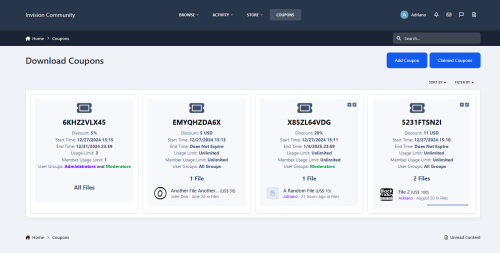
This application enables your members to generate coupon codes, offering discounts on their files within the Downloads application.
Main Features
Coupons
Select what user groups can create coupons ( This is found in the user group settings of the ACP )
Create unlimited coupons
Choose to discount either monetary values or a percentage of the price
Monetary values work in all your used currencies
A maximum of 90% discount is allowed when using a percentage
A coupon's discount CAN NOT exceed the price of the file, if it does then it will not work when trying to redeem that coupon on said file
This could happen if the member sets for example a $10 discount on all files and one of their files only costs $8
Select a start time so members can create future coupon's
Select an expiration time with the option of not expire
Select the maximum uses allowed for each coupon with an option of unlimited uses
Select the maximum times each member can use the coupon with an option of unlimited uses
Select what user groups can use each coupon
Select what files the coupon will work with with an option of all files
Members can only select their files
Coupons created by X member WILL NOT work on Y member files
If a member sets a maximum use to their coupon the value of the uses will subtract when an invoice is created and will increase if the invoice gets canceled
Coupon Usage ( Lets members keep track of their coupons via the Coupon Usage page )
View all coupons used by members.
Shows the member who used the coupon
Shows the file name
Shows the original price of the file
Shows the discount value
Shows the discounted value
Shows if the invoice is paid or pending
Requirements
Downloads
Commerce
- $20
- 2 Purchases
- 8 Downloads
Adriano -
This application will allow your members to upload music tracks to play on their profiles with a nice, tidy custom audio player.
Features
Adds a custom JavaScript / jQuery / Ajax music player to users' profiles
Allow your members to upload multiple music tracks to their profiles
Adds a playlist with all their uploaded music, allowing them to switch tracks easily
Easily edit the track names by clicking and holding the track name in the playlist without having to reload the page
Easily re-position the tracks by dragging them and dropping them into your chosen positions
The audio player has 5 buttons
Repeat ( this will repeat the playing track )
Next ( skip to the next track )
Previous ( go to the last track )
Volume ( Toggles volume bar )
This will show a volume bar that you can drag with 2 more buttons, allowing you to turn it up or down
Play / Pause ( Does what it says on the tin )
Easily delete each track without having to reload the page ( this will show a pop-up asking to confirm the deletion )
Members can customize their audio player's button/volume/progress bar from a choice of 8 colors that are either solid or with a shadow
Set auto auto-play function so members' tracks will auto-play when the page loads
Allow members to add other members' tracks to their playlists
This will not duplicate or copy any audio files; it will just add the ability for the track to be played on other members' playlists
Tracks added to playlists via sharing will not count towards the user's upload count, as they are not uploading a new track
Members can toggle the ability for other members to add their tracks to their playlists easily via the audio player
When a member grants permission for their tracks to be shared, a new add to my playlist icon will appear next to their track names
If a member adds another member's track to their playlist and the uploader decides to delete their track, the track will also be removed from all playlists it has been added to
Admin Member Group Settings ( These are set per group )
Can upload audio tracks
Select the maximum upload size per track
Select the maximum upload limit per batch of uploads
Select the number of total tracks the member can upload altogether
- $25
- 6 Purchases
- 20 Downloads
Adriano -
This application will add a widget to display random files.
Widget configuration:
Number of files to show
Categories
Requirement:
Downloads app.
- $10
Adriano -
This application will display categories, forums, and subforums within a widget, similar to how other apps like Pages and Downloads do.
Widget configuration:
Number of subforums to display Notes:
Permissions honored: The user will view categories/forums with permission to view. Although it is named Sidebar, the block can also the used in the main area.- $15
- 3 Purchases
- 16 Downloads
Adriano -
This application allows administrators to define specific rules for chosen forums. Users in designated groups will be required to agree to these rules before being allowed to create topics.
Global Settings:
Number of days to expire the cookie
Per Forum Settings:
Enable the feature in the forum
Message style: option to choose between 4 predefined styles
Groups that will be required to agree to the rules
Rule Content
The rule content is translatable, which means that you can use a specific message for each language you have installed on your board.
- $15
- 3 Purchases
- 8 Downloads
Adriano -
This application will add the following links in the navigation and mobile bars:
Mark all content as read (desktop and mobile)
Page Editor (desktop only)
This link will appear only to moderators with permission to manage the sidebar
- Free
- 17 Downloads
Adriano -
This application will create a poll wall to list polls from all applications that support polls, such as Forums, Blogs, Raffles, Quizzes, Videos Directory, Games, Tutorials, Movies, Music, Lyrics, Links Directory, and Crowdfunding, among others.
Users with permission will be able to vote and view poll results.
- $18
- 1 Downloads
Adriano -
This application enables admins to monetize their boards by allowing users to pay for pinning topics for a specified number of days. Admins can manage pinned topics based on forum and group settings.
- Requirement:
Forums: https://invisioncommunity.com/features/forums/
Commerce: https://invisioncommunity.com/features/commerce
Per forum settings:
Enabled
Groups allowed to pay to pin topics
Amounts
Amount to pin for 7 days
Amount to pin for 15 days
Amount to pin for 1 month
Amount to pin for 2 months
Amount to pin for 3 months
Amount to pin for 6 months
Settings:
Member should only request to pin their topics
Commerce:
Payment method
Tax Class
Per member restriction:
Can request to pin topics
Per group restrictions:
Number of content count to submit pin requests
Number of reputation points to submit pin requests
Number of days as a member to submit pin requests
- Note:
An invoice will be generated and the topic will be pinned once payment is received. In the meantime, the topic will not be available to be pinned by anyone else. There's a Commerce setting to define the number of days the invoice can expire (ACP -> Commerce -> Invoices -> Invoice Settings -> Invoices must be paid within). You must change the default value (30 days) to something that fits your needs.
- $20
- 1 Purchases
- 5 Downloads
Adriano